CpS 301 Intro to Database
Database Modeling 2
Part One (10 points)
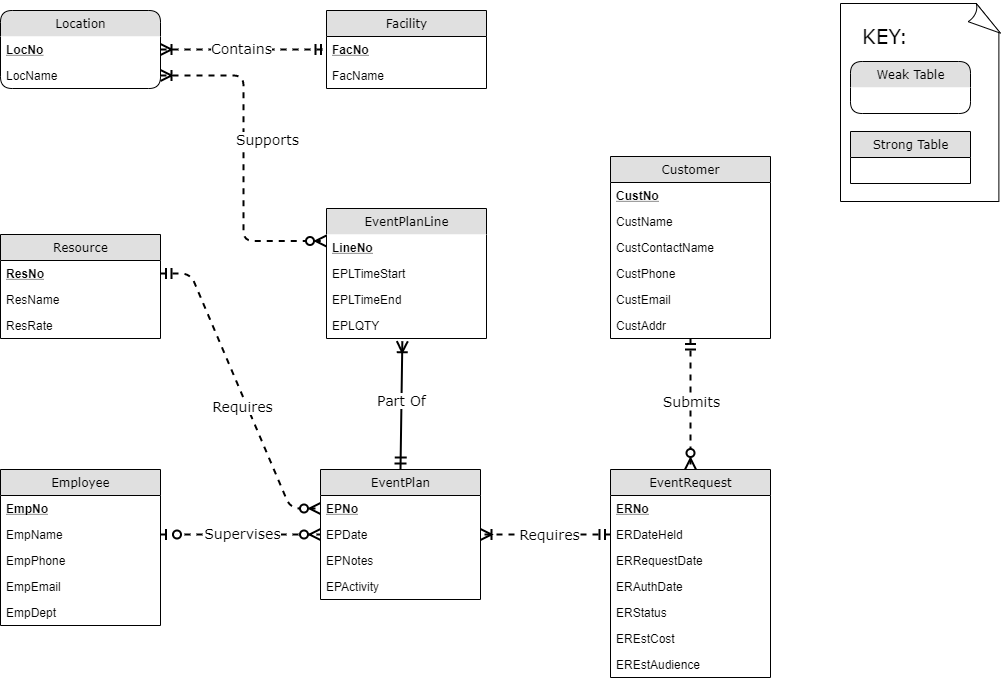
Write two sentences for each relationship line in the following diagram, one for each direction, using the technique taught in class. Remember to start with a singular noun. The sentences should reflect both the minimum and maximum cardinality information in the relationship lines.

Part Two: ERD Design (25 points)
A company asks you to create an Entity-Relationship Diagram (ERD) for managing the task assignments on a work order. A work order records the set of tasks requested by a customer at a specified location.
- A customer has a unique customer identifier, a name, a billing address (street, city, state, and zip), and a collection of submitted work orders.
- A work order has a unique work order number, a creation date, a date required, a completion date, a customer, an optional supervising employee, a work address (street, city, state, zip), and a set of tasks.
- An employee has a unique employee ID and a name.
- Each task has a unique task identifier, a task name, an hourly rate, and estimated hours. Tasks are standardized across work orders so that the same task can be performed on many work orders.
- Each task on a work order has a status (not started, in progress, or completed), actual hours, and a completion date. The completion date is not entered until the status changes to complete.
After reviewing your initial design, the company decides to revise the requirements. Refine your ERD to support the following new requirements:
- The company wants to maintain a list of materials. The data about materials include a unique material identifier, a name, and an estimated cost. A material can appear on multiple work orders.
- Each work order uses a collection of materials. For each material used on a work order, we record the estimated quantity of the material and the actual quantity of the material used.
- The estimated number of hours for a task depends on the work order and task, not on the task alone. For each task of a work order we record an estimated number of hours.
Using a drawing tool, create an ERD that reflects the final requirements. Start with the entities shown below, and to facilitate grading, put the entities in your diagram in the positions shown below (you may add space between them as needed). Your diagram must be black on a white background (not on a black background) to facilitate grading.
Keep the following in mind:
- Indicate primary keys by underlining.
- Add more entities as needed.
- Use meaningful verbs for relationship names (avoid “has”) and show both minimum and maximum cardinality indicators.
- Remember not to show foreign keys on the model.
- Determine which attributes may contain null values (assume nulls are not allowed unless the text indicates the value is optional or the information given allows you to infer that it must be optional) and indicate this on the diagram by marking nullable attributes with a trailing question mark.
Part Three: ERD Revision (30 points)
For the vet ERD shown below, improve the diagram using the guidelines given in the “Modeling Tips” lecture. You should be able to apply each of the tips at least once.
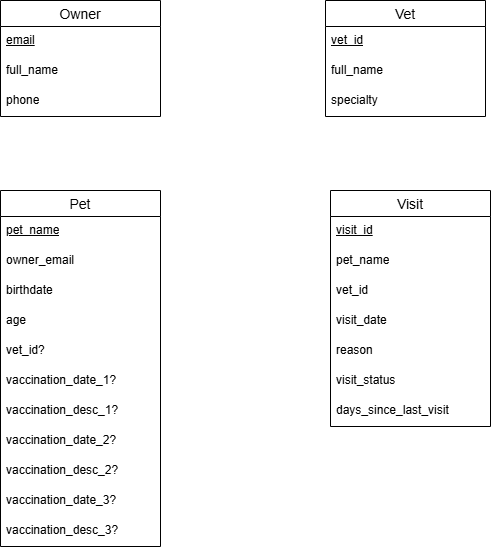
For convenience, here is a draw.io diagram for the above. Revise this diagram; do not reposition the entities.
Notes:
- visit_status values are 0 (checked in), 1 (checked out).
- If you remove an attribute from the model because it is computable from another attribute, make a note explaining what attribute you removed and how it can be computed.
Collaboration Policy
The only help you may give or receive on this assignment is clarifying assignment requirements.
Submission
Turn in a printed copy of your report. Your report should have a cover sheet with the assignment name, the course number, your name, and the date. No signed academic integrity statement is needed since no “debugging” help is permitted.